Overview for Reporting Guideline developers
This platform was made by James Harwood at the Oxford branch of the UK EQUATOR Centre. Its design and architecture were informed by a programme of research exploring why researchers often fail to adhere to reporting guidelines. This programme included a qualitative evidence synthesis, review of surveys, workshops and focus groups with experts, and interviews with researchers. It can be read here
As a reporting guideline developer, you have control over your own guideline content. To get you started, we set up a blank repository for you in GitHub.
You add (or edit) your guideline content. Reporting guidelines are stored as simple text files and metadata. There is one text file per reporting item. You can add images, embed videos, pop-up definitions, links to training or other help, and you can annotate examples of good and bad reporting. In the future we hope to offer a simple interface for editing content, but for now you can edit files directly within GitHub from your browser or from your computer if you are comfortable using git.
You notify us that your guideline is ready for publication using GitHub’s Release button. Tests run automatically to make sure your files are in the right structure and have the necessary metadata. If these tests pass, we create a version of your guideline using Zenodo. This means researchers can cite the exact version of your guideline that they followed.
Resources are generated from your files. These resources currently include:
- Web pages: Your reporting guideline will have an overview page that tells users how to use your guideline, what research it applies to, links to other guidelines (that you specify), and a summary of the guidance items. Each reporting item has its own page. All pages have metadata that optimizes them for search engines, large language models, and chat bots.
- Checklists: Downloadable Word files, where each item links back to the item’s web page.
- Discussion Boards: Each item links to a discussion board where researchers can ask questions and give feedback.
- Future resources: In the future, you will be able to generate other resources including AI agents and writing templates.
- Web pages: Your reporting guideline will have an overview page that tells users how to use your guideline, what research it applies to, links to other guidelines (that you specify), and a summary of the guidance items. Each reporting item has its own page. All pages have metadata that optimizes them for search engines, large language models, and chat bots.
The website is updated with your new resources.
We run some more automated tests before the updated website is published.
When researchers leave comments on your reporting items’ discussion boards, these comment threads are saved to your GitHub repository so you will be notified of feedback. You can then update your reporting guideline in response to this feedback.
Technical overview
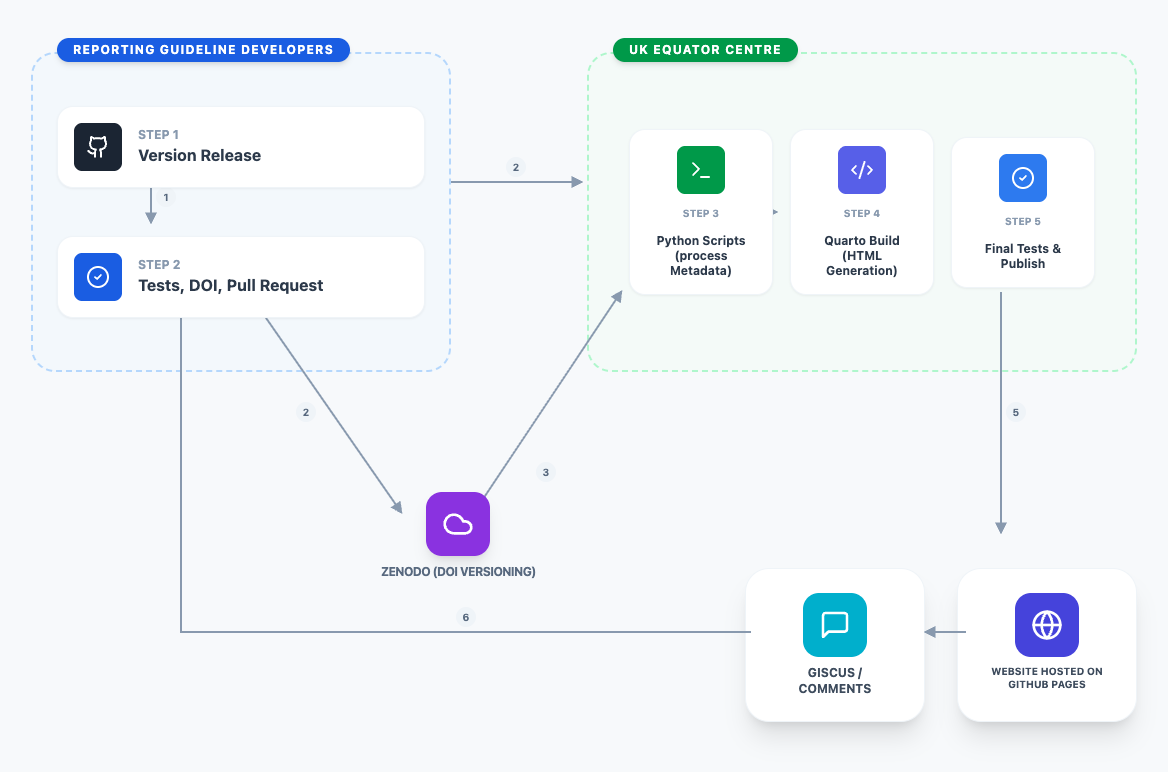
- The platform is a static website hosted on GitHub pages. Each reporting guideline is hosted in its own GitHub repository, and included in the main platform’s repository as submodules. This means reporting guideline developers can edit their own content. Reporting guideline developers trigger a release when they want to publish an update.
- All repositories use continuous integration, whereby GitHub Actions runs unit, system, and integration tests. These tests must pass for commits to the master branch and releases to be accepted.
- If tests pass, GitHub actions notifies Zenodo to update DOI so that the version becomes citable and notifies the main platform repository to pull the updated guideline. The main platform pulls the updated DOI from Zenodo, runs some Python scripts to regenerate reporting guideline resources. By default these include a checklist file, a summary webpage, webpages for each reporting item, and discussion board pages for each item. Python generates these resources as Markdown files.
- Quarto converts these Markdown files into other formats (HTML for web pages, Microsoft Word for documents etc).
- A second set of automated tests validate the generated resources and website.
- Once built, the website is served using GitHub Pages. Each reporting guideline item has its own Giscus discussion board, where comments are stored as GitHub Discussions linked to the relevant file stored in the reporting guideline repository.


